Erosion uses a structuring element, also called a probe, to shrink the foreground in a binary mask. It removes foreground pixels near boundaries and keeps positions where the probe fits completely inside the foreground.
The mask uses 1 for foreground and 0 for background. The probe's anchor is the reference cell used to position it, usually its centre.
Main idea
Place the probe's anchor on a foreground pixel. Keep that pixel only when every active probe cell covers foreground. If even one active cell covers background, change the output pixel at the anchor to
0.
Near an object's edge, part of the probe can extend into the background, so that position is removed. Farther inside, the whole probe can fit, so that position remains. This explains why erosion shrinks the object. SciPy describes this full-fit rule.
How Erosion Works
- Start with a separate output mask filled with
0 - Move the probe's anchor across the input image (square probe)
- At each position, check the input pixels under all active probe cells
- If every checked pixel is
1, set the output at the anchor to1; otherwise, leave it as0
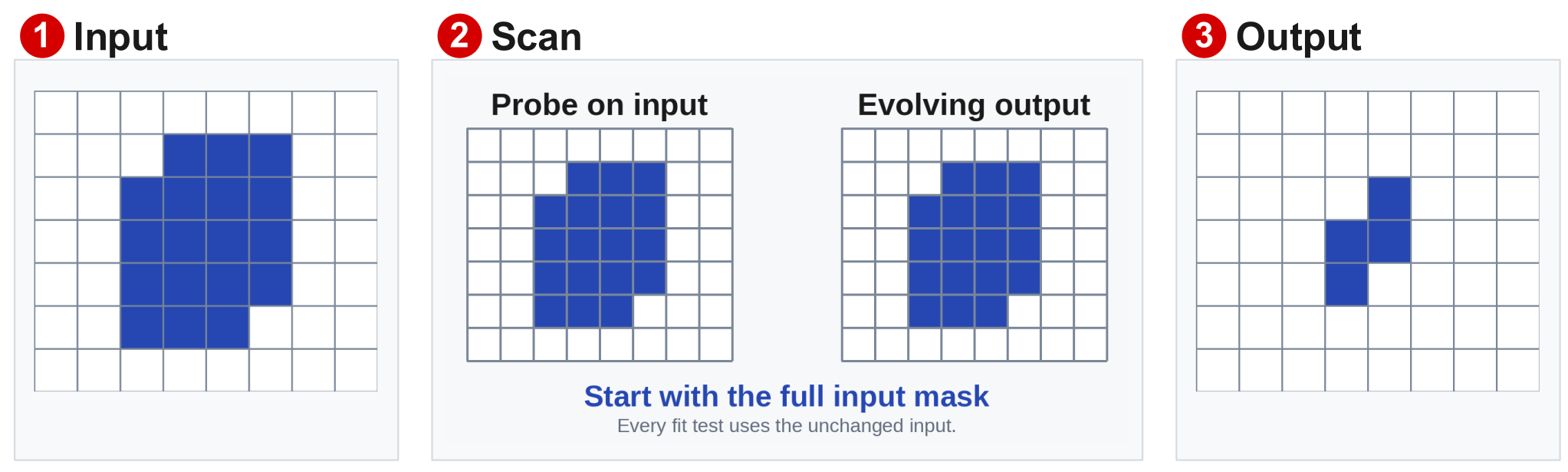
With a centred horizontal probe of 0 1 0, the middle input value is shown in brackets:
Input under probe:   1 [1] 1   ->   output at anchor: 1
Input under probe:   0 [1] 1   ->   output at anchor: 0
The second position fails because the probe reaches a background pixel on the left.
Keep only the anchor position
A successful fit produces one foreground output pixel, at the anchor. Repeat the test to find all positions that remain foreground.
Keep the input fixed during one pass
Check every position against the same input mask. Use a separate output mask so that removing one pixel cannot affect the next test.
Erosion uses the minimum, or logical AND, of the selected binary values. For example, min(1, 1, 0) = 0. OpenCV explains the minimum rule.
Worked Example: Shrink a Horizontal Line
Use a 1-by-3 horizontal probe with an active centre anchor:
Probe:       1 [1] 1

Input row:   0 1 1 1 1 1 0
Output row:  0 0 1 1 1 0 0
What happens:
- The first foreground pixel fails because its left neighbour is
0 - The last foreground pixel fails because its right neighbour is
0 - The three interior pixels pass because each has foreground on both sides
The line loses one pixel from each end. Its vertical thickness stays the same because the probe tests positions along the row.
Understanding the Equation
Meaning of each symbol:
| Symbol | Meaning |
|---|---|
| Set of input foreground positions | |
| Active positions in the structuring element | |
| Candidate output position | |
| Probe shifted so its anchor is at | |
| Every active probe position lies inside | |
| Erosion operation |
In words: keep position when the entire probe fits inside the foreground. MathWorks gives this set-containment definition.
How Probe Shape Changes the Result
A 3-by-3 cross tests the centre and its four direct neighbours:
Cross probe:       Input patch:

.  1  .            0  1  0
1 [1] 1            1 [1] 1
.  1  .            0  1  0
The input's centre passes because all five required positions are 1.
Only active cells count
The dots are outside the probe shape. Those corners are ignored, so they can contain either
0or1. A0in a binary probe also means an ignored position.
A 3-by-3 square tests all nine positions. The same input centre fails because the square includes the four background corners.
For a cross, check these five positions at each anchor:
- Centre, top, bottom, left, and right must all be foreground
How Probe Size Changes the Result
A larger probe of the same shape needs more foreground around the anchor to fit completely.
For a solid 5-by-5 foreground square, surrounded by background:
| Centred square probe | Output after one erosion |
|---|---|
| 3-by-3 | A 3-by-3 foreground square |
| 5-by-5 | One foreground pixel at the centre |
| 7-by-7 | All output pixels are background |
If an object cannot contain the probe at any position, it disappears. Repeating erosion uses the previous output as the next input and can remove more foreground.
Erosion Compared with Dilation
For the same centred, symmetric probe:
| Operation | Condition for output 1 | Effect |
|---|---|---|
| Erosion | All active probe cells cover foreground | Shrinks foreground |
| Dilation | Any active probe cell covers foreground | Expands foreground |
Erosion is not an undo operation
Erosion removes pixels using its own rule. It cannot identify which pixels an earlier dilation added, so applying both can change the original shape.
Uses and Limits
Typical uses:
- Remove isolated foreground speckles
- Remove uncertain boundary pixels
- Separate objects connected by a thin foreground bridge
Practical limits:
- Useful thin structures and small objects can also disappear
- The main object shrinks as unwanted foreground is removed
- A bridge breaks only if its shape and width prevent the probe from fitting there
The examples use probes with an active anchor, so any background anchor fails the test. Under this condition, erosion can only keep or remove existing foreground pixels.
At an image edge, define how positions outside the image are handled. With outside the image = 0, a position fails if an active probe cell extends beyond the image.