Dilation uses a structuring element to expand the foreground in Binary Masks. The probe's shape and size control the direction and amount of growth.
Key idea
Dilation is applied to the foreground area and used to spread it to cover more area of the mask.
How Dilation Works
For probes that are symmetric about their anchor, such as centred lines, crosses, and squares, these two methods give the same result.
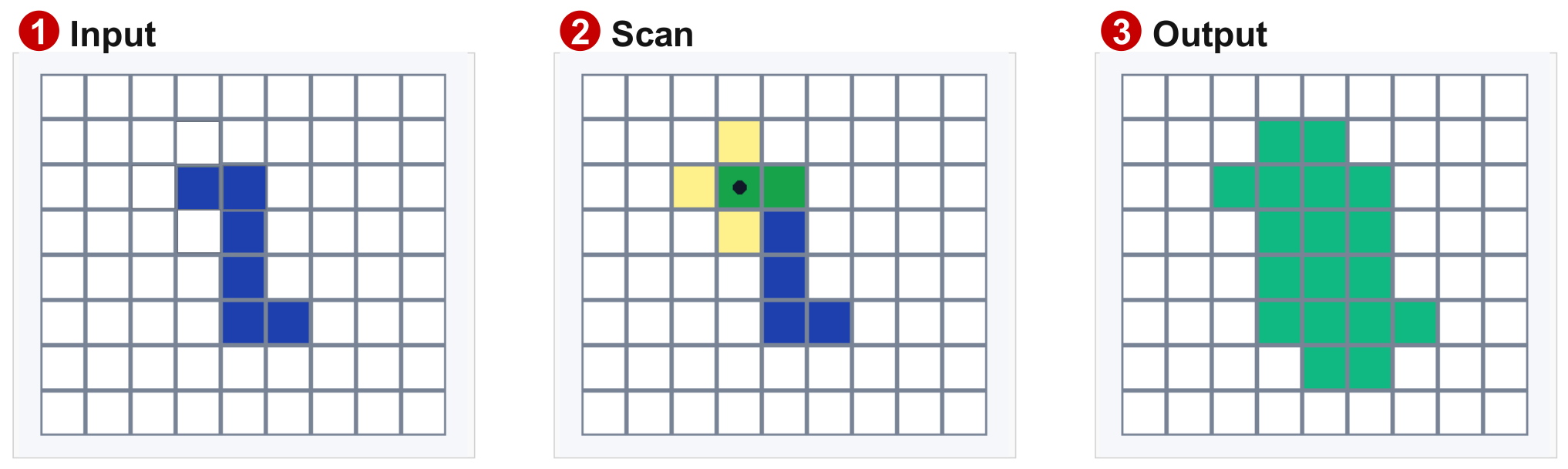
Method 1: Stamp the Probe
Main Idea
This is the process of placing our structuring element's anchor point (center) on each foreground pixel, and converting those active probe cells to 1
- Start with an output mask filled with
0 - Place the probe's anchor on each foreground pixel in the input
- Set every output position covered by an active probe cell to
1 - Combine all the stamped regions
This combination is the union of the shifted copies. A pixel covered by several copies still has value 1. SciPy describes dilation using this stamping rule.
Method 2: Test Each Output Position (Equation below)
- Place the probe's anchor at the output position being tested
- Check the input pixels under the probe's active cells
- Set the output to
1if any checked input pixel is1; otherwise, set it to0
The anchor can be over a background pixel. A nearby foreground pixel can make that position become foreground.
This is a maximum, or logical OR, over the selected binary values. For example, max(0, 1, 0) = 1. OpenCV explains the maximum rule.
Keep the input fixed during one pass
Read all positions from the same input mask and write the results to a separate output. Use newly added pixels as input only when starting another iteration.
Understanding the Equation
For a probe that is symmetric about its anchor:
Meaning of each symbol:
| Symbol | Meaning |
|---|---|
| Set of input foreground positions | |
| Structuring element | |
| Candidate output position | |
| Probe shifted so its anchor is at | |
| Intersection, the positions shared by two sets | |
| At least one shared position exists | |
| Dilation operation |
Extra detail: probe reflection
The standard overlap equation uses a reflected probe, , rotated by about its anchor. Centred lines, crosses, and squares have the same shape after this rotation, so the equation above gives the same result. For an asymmetric probe, check the stated convention. MathWorks explains this distinction.
Worked Example: Repair a Horizontal Gap
Use a 1-by-3 horizontal probe with its anchor at the middle cell:
Probe:       1 [1] 1

Input row:   0 1 1 1 0 1 1 1 0
Output row:  1 1 1 1 1 1 1 1 1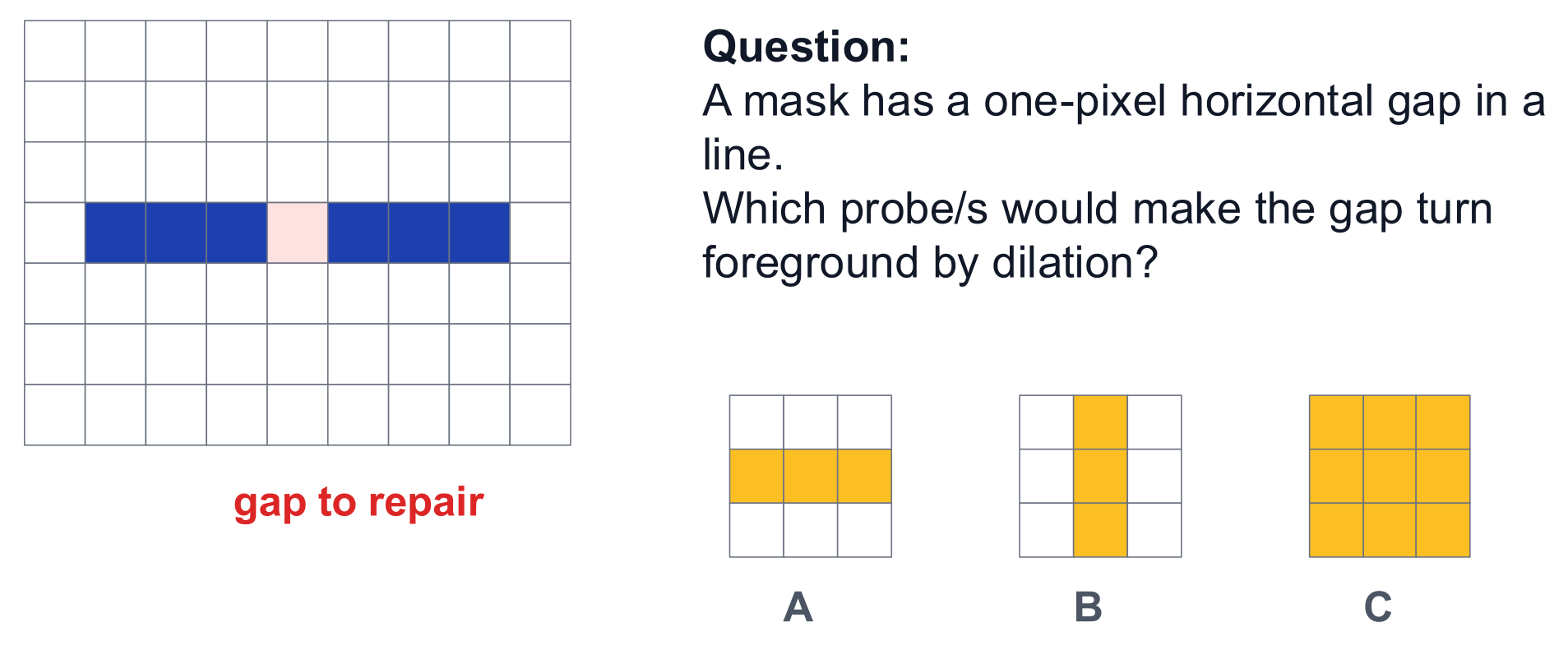
Each foreground pixel covers itself and one position on each side. The central gap becomes foreground, and both outer ends extend by one pixel.
For a one-pixel-thick horizontal line with a one-pixel gap, compare these centred probes:
| Probe | Fills the horizontal gap? | Effect on thickness |
|---|---|---|
| 1-by-3 horizontal line | Yes | Keeps the line one pixel thick |
| 3-by-1 vertical line | No | Thickens each fragment vertically |
| 3-by-3 square | Yes | Thickens the line vertically |
Best choice: horizontal line probe
Both the horizontal line and square fill the gap. Choose the horizontal line when the line should keep its original thickness.
How Probe Shape Changes Growth
For one dilation pass with centred 3-by-3 probes:
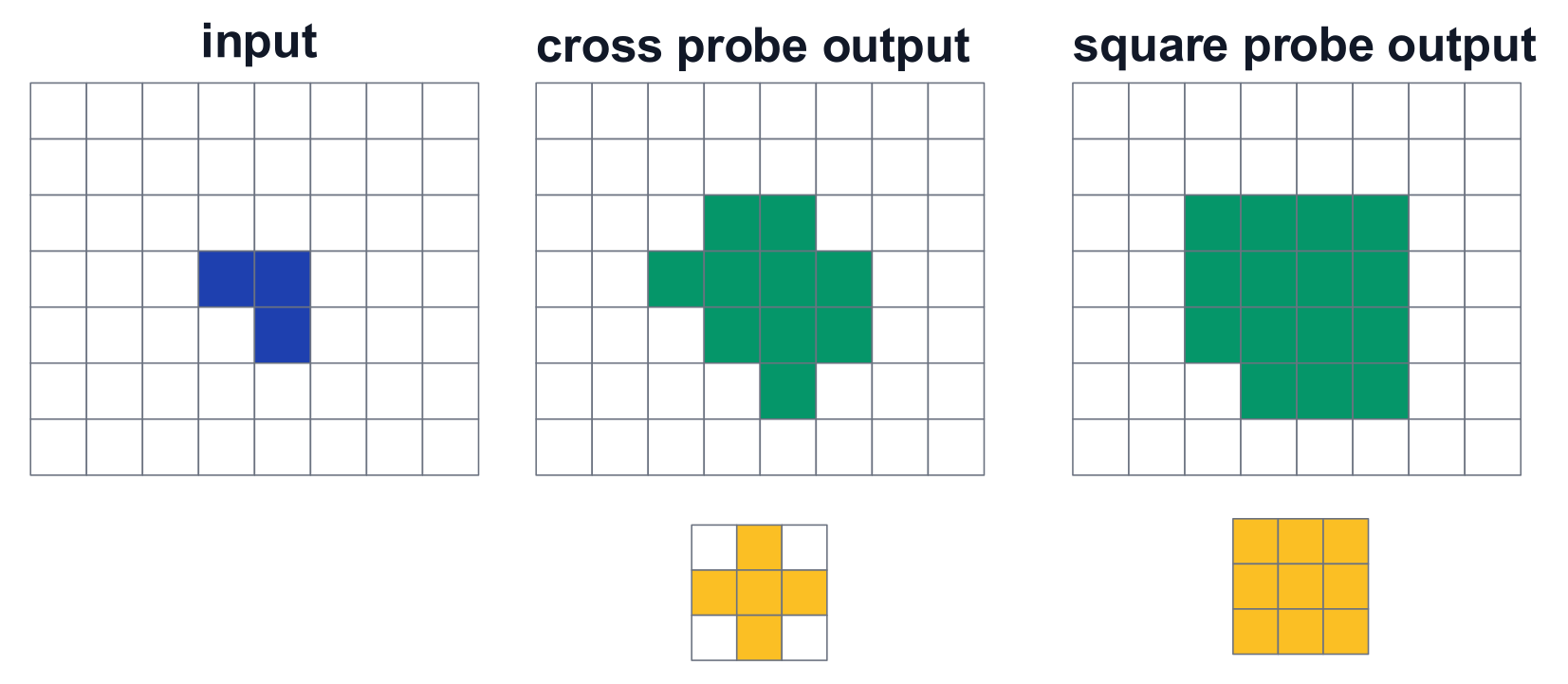
- A cross adds the four direct neighbours around each foreground pixel
- A square also adds the four diagonal neighbours
A larger probe can reach farther. More iterations can also extend the foreground. For example, two cross dilations can reach diagonal positions through two steps. SciPy shows cross, square, and repeated-dilation examples.
Active probe cells
A
0in the probe means that position is ignored. A0in the input mask means background. MathWorks defines the active and ignored probe positions.
Uses and Limits
Typical uses:
- Connect small gaps in text strokes or cracks
- Thicken thin structures
- Expand a mask to include nearby context
Practical limits:
- Nearby objects can merge into one region
- Small foreground noise can also grow
- The result depends on the probe's shape, size, and number of iterations
When the probe's anchor is active, every original foreground pixel remains foreground. This follows from stamping: each pixel covers its own position.
At an image edge, define how positions outside the image are handled. A common assumption is outside the image = 0. Keep the output on the selected grid.