Choose a morphological operation according to how the foreground should change. Then choose a structuring element, also called a probe, whose shape and size suit that change.
Main idea
Choose the operation for the required effect, then choose the probe for the geometry. The same operation can produce different results with different probes.
Choose the Operation
In a binary mask, foreground pixels represent the selected object and background pixels represent everything else.
| What should change? | Operation | What it does |
|---|---|---|
| Expand the foreground or thicken a structure | Dilation | Adds foreground around existing foreground |
| Keep an object's interior and remove boundary pixels | Erosion | Keeps positions where the probe fits completely inside foreground |
| Remove small unwanted foreground regions while retaining larger objects | Opening | Erodes first, then dilates the remaining regions |
| Fill small holes or breaks while keeping the outside size close to the original | Closing | Dilates first, then erodes the expanded regions |
Opening and closing use the same probe in both steps. MathWorks describes these four operations.
Identify the unwanted pixels
Extra foreground, such as speckles, suggests opening. Missing foreground, such as small holes or broken strokes, suggests closing.
Choose the Probe Shape
Match the probe to the directions and structures involved:
| Probe | Useful for | Main effect of its shape |
|---|---|---|
| Aligned line | Straight cracks, scratches, or strokes | Acts along the line's direction |
| 3-by-3 cross | Testing direct neighbours | Uses the centre, top, bottom, left, and right positions |
| 3-by-3 square | Compact regions and small defects in several directions | Uses all nine positions, including the corners |
| Disk | Curved boundaries and compact objects | Gives an approximately circular neighbourhood |
| Ellipse | Elongated regions with curved boundaries | Extends farther along one axis |
A line probe can be horizontal, vertical, or set at another angle. Choose its direction to match the structure. MathWorks explains how the probe defines the selected neighbourhood.
A cross and a square test different positions
A 3-by-3 cross ignores the four corners. During erosion, its centre can pass even when those corners are background. A square requires foreground at the corners too.
Choose the Probe Size
Consider both the unwanted feature and the useful detail:
- For opening, the probe should fit inside wanted structures and fail to fit inside unwanted regions
- For closing, it should reach across unwanted gaps while keeping wanted separations open
- For dilation, its extent sets the added margin
- For erosion, its extent determines which boundary positions are removed
Size depends on width and shape, as well as length. A long thin scratch can contain an aligned line probe while failing to contain a square probe.
Larger probes affect more detail
Opening or erosion can remove useful thin structures. Closing or dilation can join objects that should remain separate. Check the smallest useful feature and the narrowest wanted separation.
Practical Choices
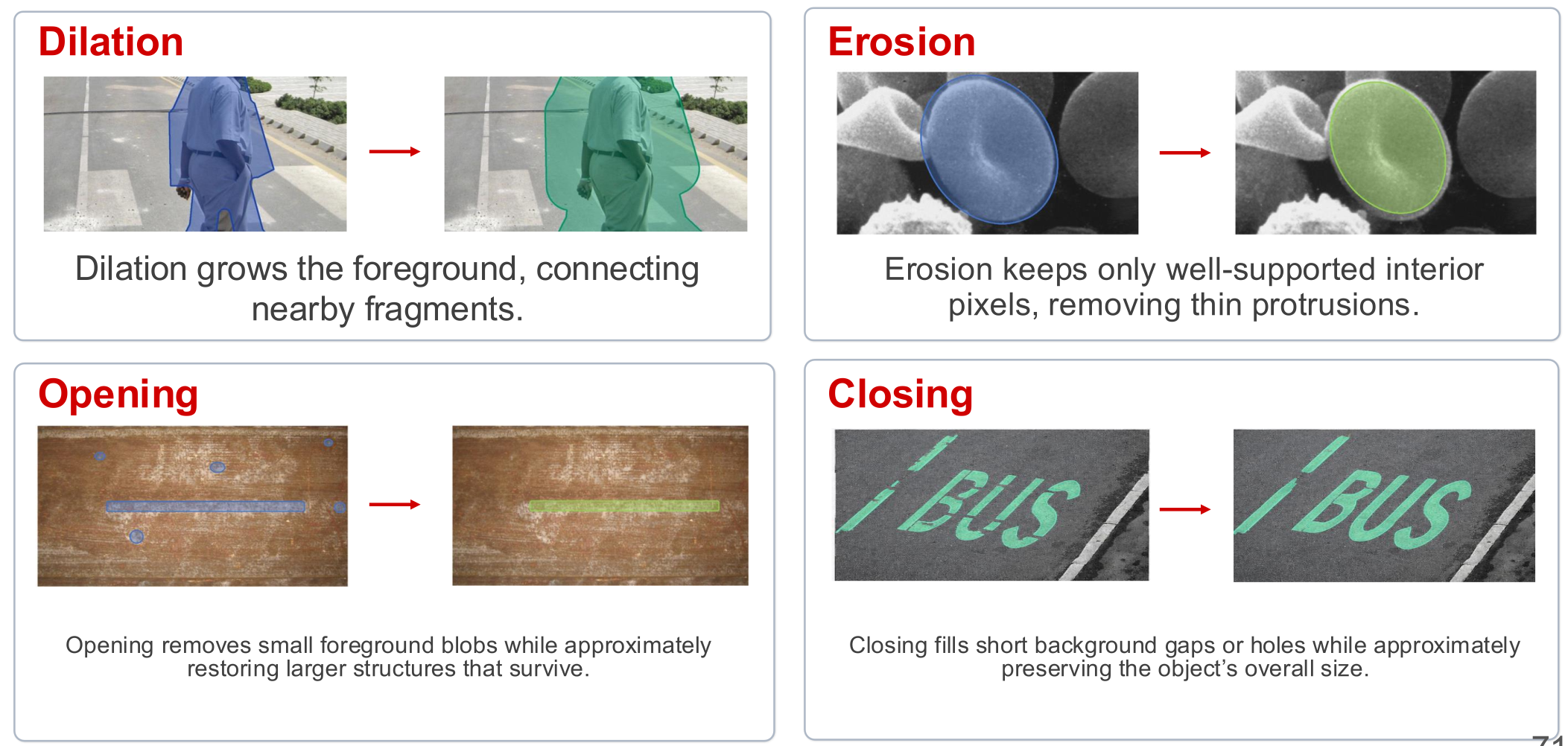
| Required result | Operation and probe | Why it fits | Main risk |
|---|---|---|---|
| Add a roughly uniform margin around a person's mask | Dilation + disk | Expands the mask around its boundary | Nearby masks can merge |
| Repair breaks in curved lettering | Closing + small disk | Bridges short gaps, then reduces outer growth | Separate strokes can join |
| Keep a long scratch and remove small round detections | Opening + aligned line | The line fits inside the scratch but cannot fit inside the small detections | Short, curved, or differently aligned scratches can disappear |
| Keep pixels farther inside a cell mask | Erosion + disk | Removes a band around the boundary | Small cells and narrow branches can disappear |
Check the Result
After choosing the operation and probe:
- Check that the intended speckles, holes, or gaps changed
- Check that useful small structures remain where required
- Check whether separate objects joined or one object split
- Compare the object's final size with the intended result
Adjust the probe's shape, direction, or size according to the observed problem.