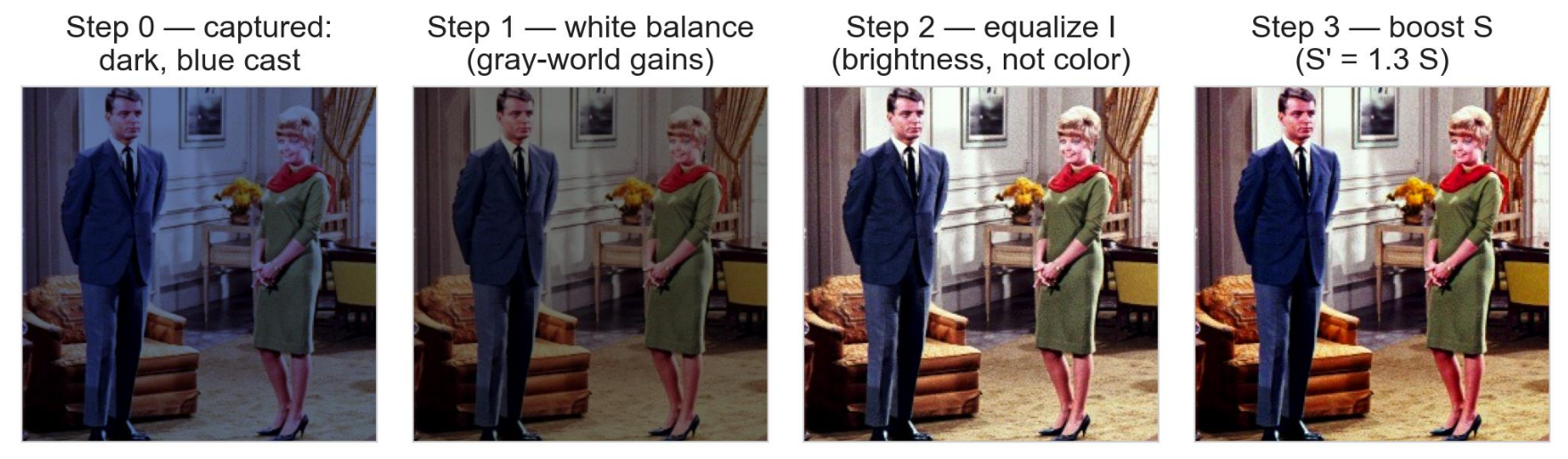
- this image shows the steps of how to perform colour correction
- we start with fixing White Balance first
- then we deal with the brightness
- then we move on to Saturation,
- colours matter because there are 2 million over colours and only 100 grays
- colours is our widest channel
- visible colour spectrum spans from 380 nm (violet) to 700 nm (red) in wavelength
- we see at least 200 different colours + 500 different steps of intensity + and 20 steps of saturation, which gives us the
Complement Colour
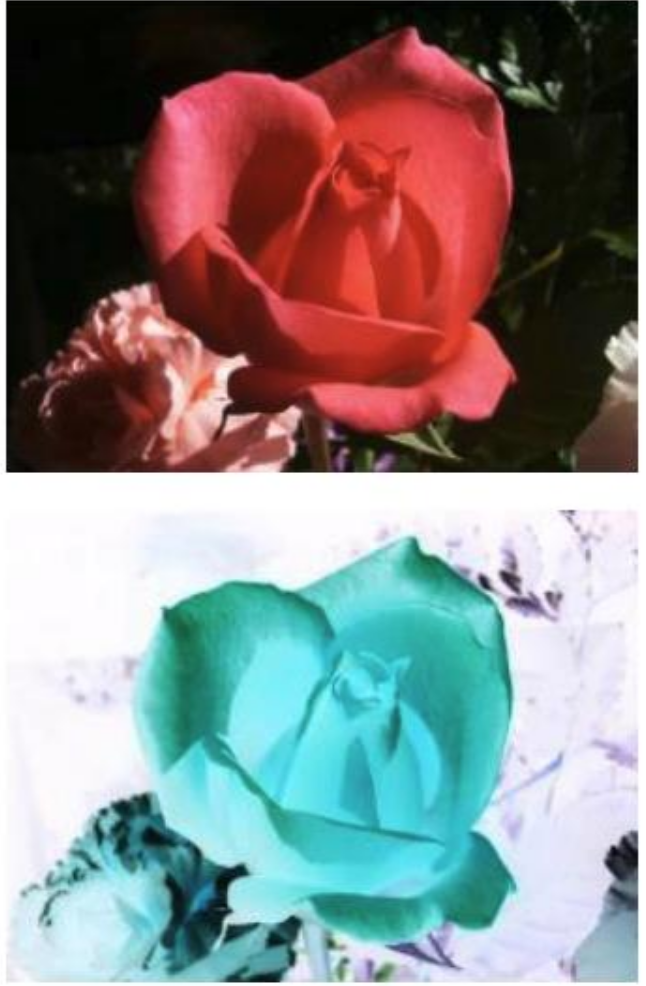
- this image shows the original image at the top with the inverted image at the bottom, allowing us to reveal details in dark regions
red <-> cyan, green <-> magenta, blue <-> yellow(R,G,B) -> (L-R, L-G, L-B)where L is the maximum intensity level for the pixel depth being used- for a standard 8-bit image, we use meaning from
1-256, but we change it to0-255, thereforeL = 255
Saturation
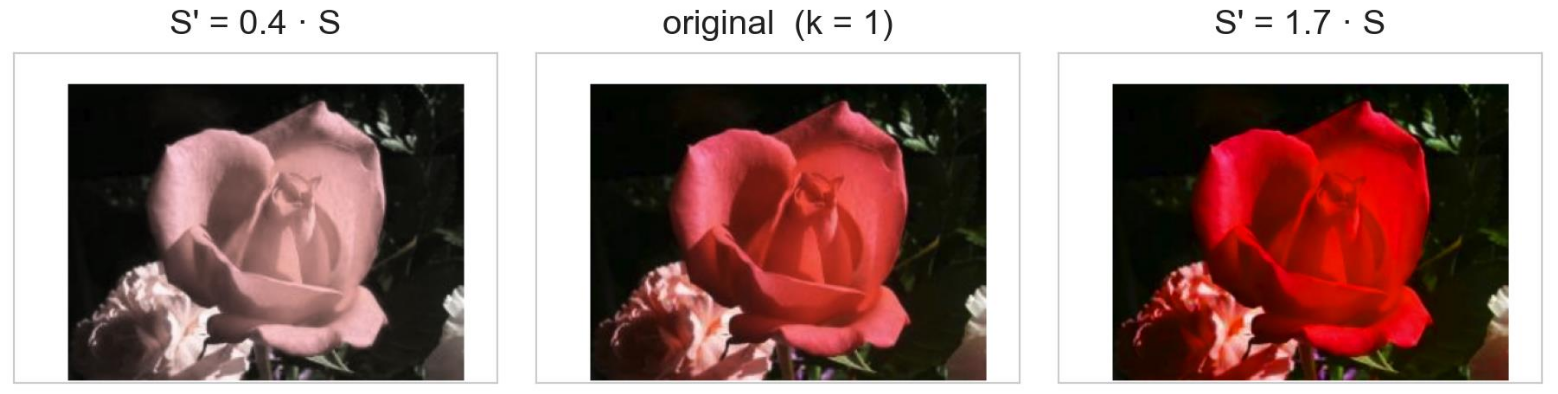
- this shows we can vary the value to change the amount of saturation by applying at every pixel, while leaving and untouched
- moves towards gray, while moves towards vivid
- small rotation can fix casts
- a colour cast refers to unwanted tint or overall shade of colour that evenly affects an entire image
- a neutral gray or white object in a perfectly balanced image would have equal Red, Green, Blue intensities
Equalization of Colour
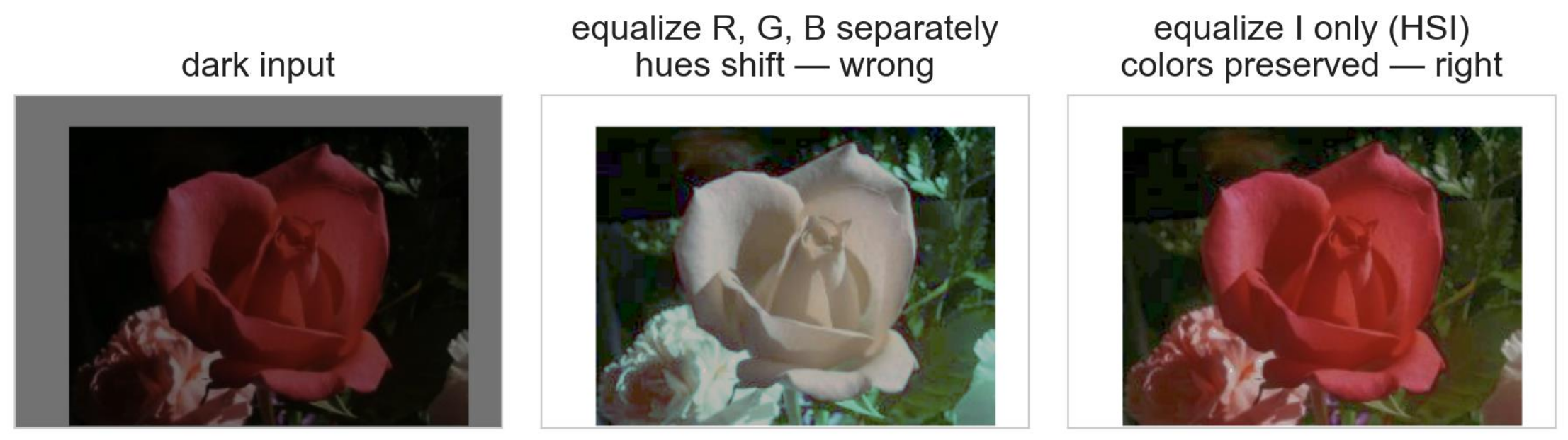
DOs:
- equalize only I (in HSI)
- increase brightness
- colours are safe
DONT:
- equalize R, G, B seperately
- ratios change
- hues drift
Colour Balance
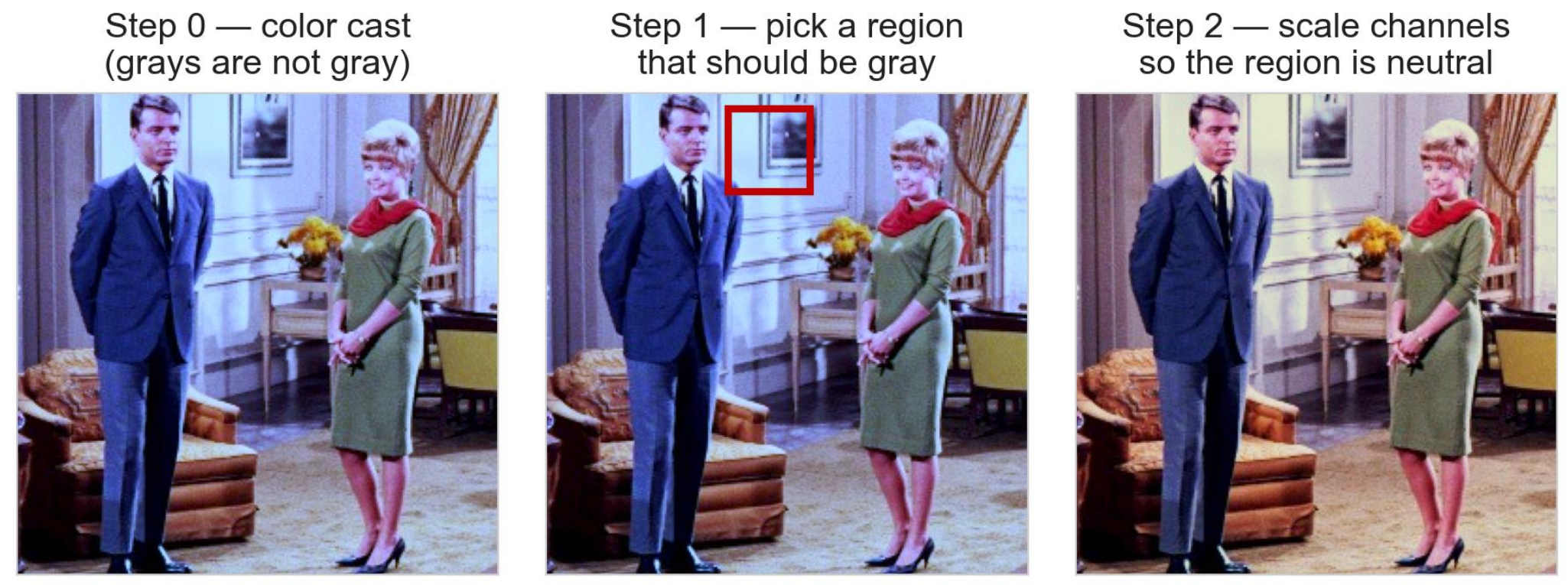
- fixing colour balance is all about fixing the cast (of unequal channel gains)
- what we can do is find something that is supposed to be gray
- scale R and B until it is gray
White Balance Gain Formula
- let the raw gray reference be
- if the green channel stays fixed, use as the target for all three channels
Therefore:
Apply these gains to every pixel :
For a gray reference :
For a raw pixel :
- use
target/rawfor each gain so that the corrected gray reference has equal RGB values
Colour Crosstalk
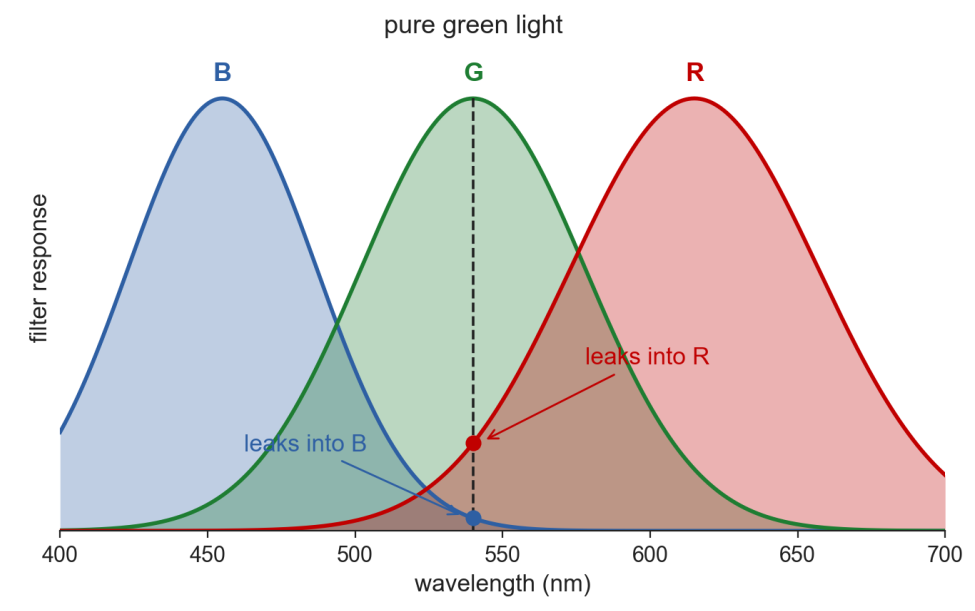
- this occurs when the colour filters on a camera sensor overlap in their spectral responses
- it can be seen in the above diagram where the RGB filter responses overlap
- this causes washed-out colours
For Example:

		           Pure Green Light (540nm)
	                          │
┌─────────────────────────────┼─────────────────────────────┐
▼                             ▼                             ▼
Green Channel            Red Channel                   Blue Channel
(Intended Target)      (Unwanted Leak)                (Unwanted Leak)
- how we fix this is by using a
3x3matrix per pixel - This matrix subtracts the estimated leaked signals from adjacent channels, restoring pure colours
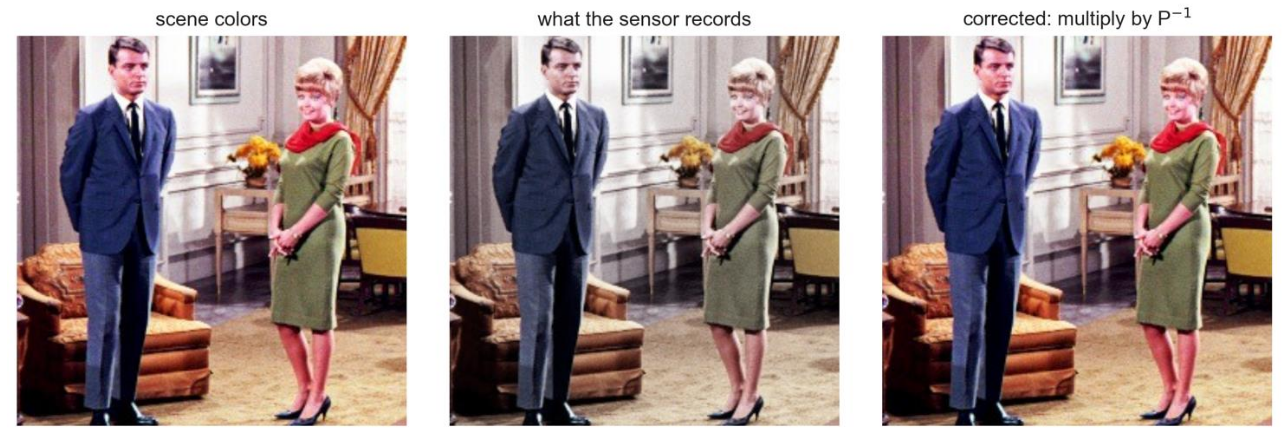
- represents the inverse colour transformation matrix used to unmix (correct) the distorted RGB signals recorded by the camera sensor
- When light hit the camera sensor, colour filters overlap which causes the mixing of true colours () that results in corrupted colours ()
- We model this mixing, or as stated above as overlapping of filters as spectral mixing matrix, :
- To undo this crosstalk/mixing/overlapping filter responses, we multiply both sides by the inverse matrix/inverse of the spectrial mixing matrix, :
- where is called the correction matrix
Colour Denoising (Median Filter)
Impulse Noise is noise where only a percentage of pixels are corrupted, but those pixels are hit with extreme min/max outlier values while surrounding pixels remain completely uncorrupted. Impulse noise can be found in both Greyscale and Coloured Images.
In Greyscale:
- "salt & pepper" noise, which consists of isolated outliers often expressed as a percentage of the overall image (e.g. 15% salt and pepper noise)
- such as purely black
(0,0,0)or white noisy pixels(255,255,255)
In Colour (RGB):
- a corrupted pixel can have individual channel saturated to extreme values.
- For example,
(255,0,0)for pure red,(0,255,255)for cyan, or(255,255,255)for pure white
On the otherhand, Gaussian Noise is an additive, continuous noise where small random values (following a Bell Curve/Normal Distribution centered at zero) are added to every single pixel in the image.
- A Median Filter is able to completely remove these "salt and pepper" noise
- but it will only reduce Gaussian noise (never completely removed)
- if we were to use a mean (averaging) filter, it would smear the impulse noise ("salt and pepper noise") across surrounding pixels instead of removing it
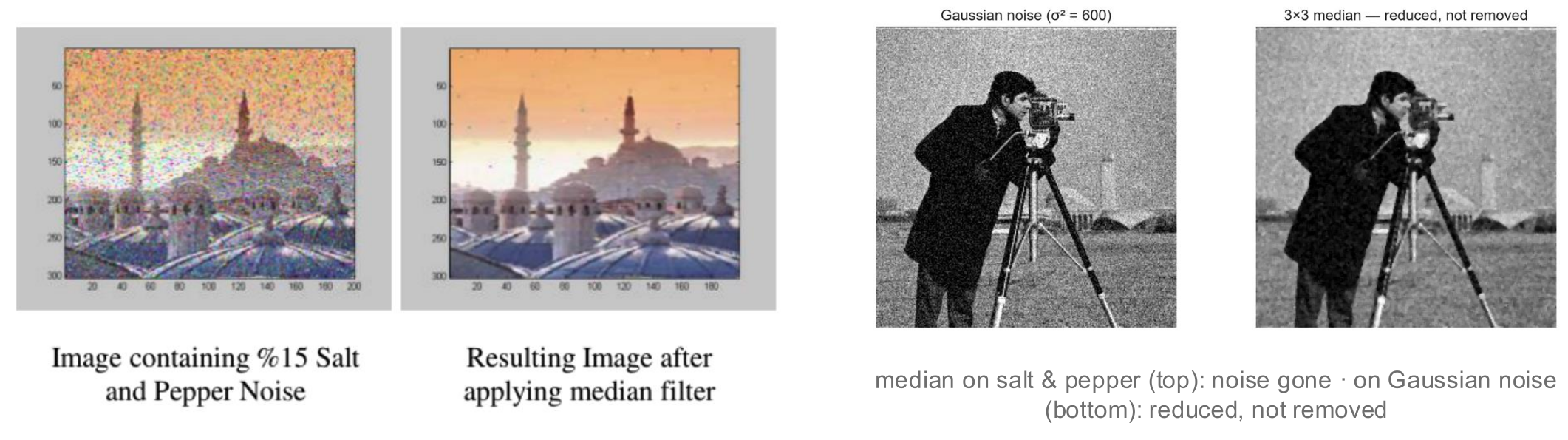
-
For Salt & Pepper noise in color: The median filter is applied across the color components (or via Vector Median Filtering) so extreme outlier specks disappear without destroying edge color.
-
For Gaussian noise in color: Smoothing operations are typically performed on the Intensity (I) channel in HSI space, or via vector filters, so color hues (H) are not distorted while smoothing out spatial graininess.
How it works is we first look at this particular 3x3 window on our image at a random spot. Let's say the local pixel window is as such:
┌─────┬─────┬─────┐
│ 12  │ 15  │  14 │
├─────┼─────┼─────┤
│  10 │ 255 │  13 │
├─────┼─────┼─────┤
│  11 │ 12  │  14 │
└─────┴─────┴─────┘
- we can see the center piece contains a purely black pixel which we wanna remove
- we collect all values in the sliding window:
[12,15,14,10,255,13,11,12,14] - we then sort them in ascending numerical order:
[10,11,12,12,13,14,14,15,255] - we pick the median value which is
13 - central pixel of value
255is replaced by13
Note how with median filter there is no convolution, thereby we can't call this a kernel. It is only called a filter or a sliding window.
Steps on how to fix a Bad Coloured Image
- Fix White Balance first
- Equalize I (brightness)
- Boost S (saturation)