Overview
- LLaVA is a simple MLLM: a CLIP vision encoder, then a linear layer (later an MLP), then the LLM
- it uses the patch tokens of the second-last layer, not the final CLS token
- token budget: a 336 by 336 image gives 576 visual tokens
- training has two stages: first only the projector, then the projector and the LLM together
LLaVA (Large Language and Vision Assistant) is a simple and strong MLLM. A CLIP vision encoder reads the image, a linear layer (later an MLP) maps the visual tokens into the LLM's input space, and the LLM answers. Its design choices show which visual tokens to use and how to train the connector.
Which visual tokens
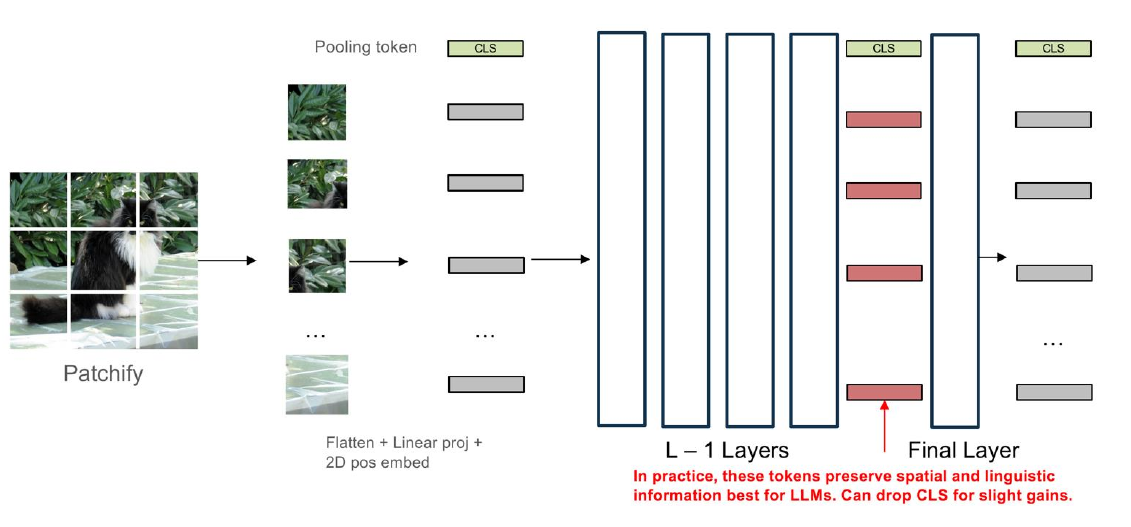
- the image is cut into patches ("patchify"), and each patch is flattened, linearly projected and given a 2D position embedding
- CLIP's final layer is tuned for the contrastive CLS token, which summarises the whole image
- the penultimate-layer patch tokens (from layer ) keep spatial and linguistic detail, so they work best for LLMs; the CLS token can be dropped for a slight gain
- a linear layer (an MLP in later versions) maps these tokens into the LLM's input space
Token budget
- a 336 x 336 image with 14 x 14 patches gives 576 visual tokens, before any text
- for higher resolution, the image is split into tiles and each tile is encoded, which gives sharper text and small objects, but more tokens
- for the encoder choice, newer MLLMs swap CLIP for SigLIP 2, which adds captioning and dense objectives
Two-stage alignment training
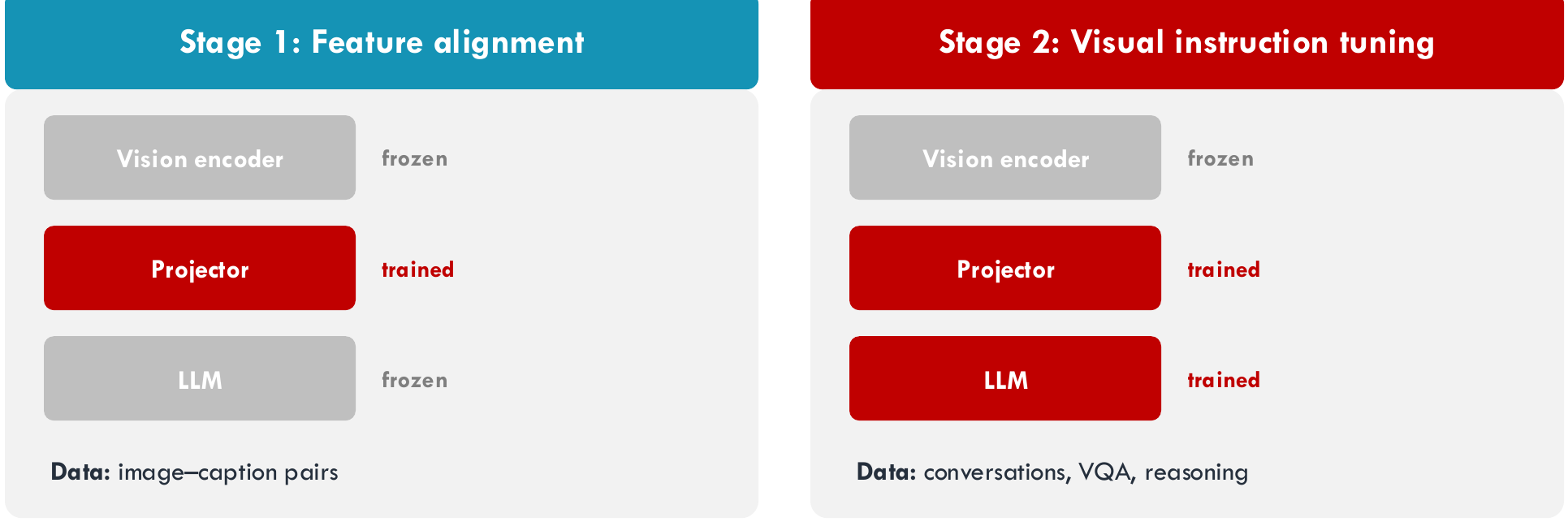
Stage 1, feature alignment:
- the vision encoder is frozen, the projector is trained, and the LLM is frozen
- the data is image-caption pairs
- this teaches the projector to "translate" image features into the LLM's language
Stage 2, visual instruction tuning:
- the vision encoder is frozen, and both the projector and the LLM are trained
- the data is conversations, visual question answering and reasoning
- this teaches the whole system to follow instructions about images
Note
LLaVA uses the simplest connector type. The other connector types are compared in Input-side Projection.